Hamnix logo
1.0.22 — live in the linux channel

Hamnix Linux

Everything above the kernel is ours and is written in Adder: PID 1, the shell, the window system, the compositor, the desktop, the file manager, the package manager. The kernel is Linux's, unmodified — which is how the driver problem stops being ours.

It boots to a desktop, installs itself onto UEFI + ext4, and updates from this site with signed packages. The tested path today is a virtual machine.

1.0.22current release, live now
124signed packages in the channel
25applications in the menu, in 7 categories
363Adder applications that build for Linux
1userland, shared with the native OS

The userland is the product

Hamnix started as a from-scratch operating system with its own x86_64 kernel. Hamnix Linux is the same userland, retargeted onto the Linux kernel — not a fork of a distribution, and not a desktop environment bolted onto someone else's base. There is no systemd, no glibc userland, no GNU coreutils in the boot path. There is an Adder program at PID 1 and Adder programs above it.

An Adder PID 1

The kernel execs /inituser/linuxinit.ad — which builds the namespace with bind, execs hamsh, and runs the rc scripts. On the native OS the kernel posts those file servers itself; on Linux, PID 1 does. Above that line the code is unchanged.

Plan 9-shape namespaces

bind and per-process namespaces, implemented on Linux primitives. Networking is the /net file tree — TCP, UDP, ICMP, TLS and DHCP dialled through files — and the window system is /dev/wsys, a file server, not a socket protocol.

Debian and Alpine, as subtrees

enter debian { … } and enter alpine { … } in one boot, from the console and as an unprivileged user, each mapped to a medium by ext4 volume label so a renumbered disk cannot silently change which one you entered. Each gets its own section in the application menu.

It updates itself

hpm installs and upgrades the whole distribution from 255.one/linux/ over TLS, with Ed25519-signed indexes verified against a compiled-in key — including replacing /bin/hamsh while it is PID 1. Proven end to end: install an old version, publish a newer one, hpm update, and the upgraded binary runs. No re-imaging anywhere in it.

A desktop, not a demo

Compositor, panel, taskbar, workspaces, and a categorised Applications menu with a search box, fly-out submenus and favourites. A file manager, a terminal, a text editor, a system monitor, a package manager UI. Every menu entry now ships in the same package as the program it points at, so an entry cannot be published without its program.

It compiles itself on the box

ac foo.ad -o foo works on a machine installed from this site — natively, and through clang inside the Debian namespace. That is enforced by a gate that unpacks the toolchain out of the published tarballs and compiles with those files and nothing else, because for eleven versions it was true of the image and false of the channel.

Screenshots

Every pixel here is real scanout, captured with QEMU's screendump off the framebuffer the guest actually presented. Nothing is re-rendered, upscaled, composited or mocked. Some are cropped to the window that appeared; none are retouched.

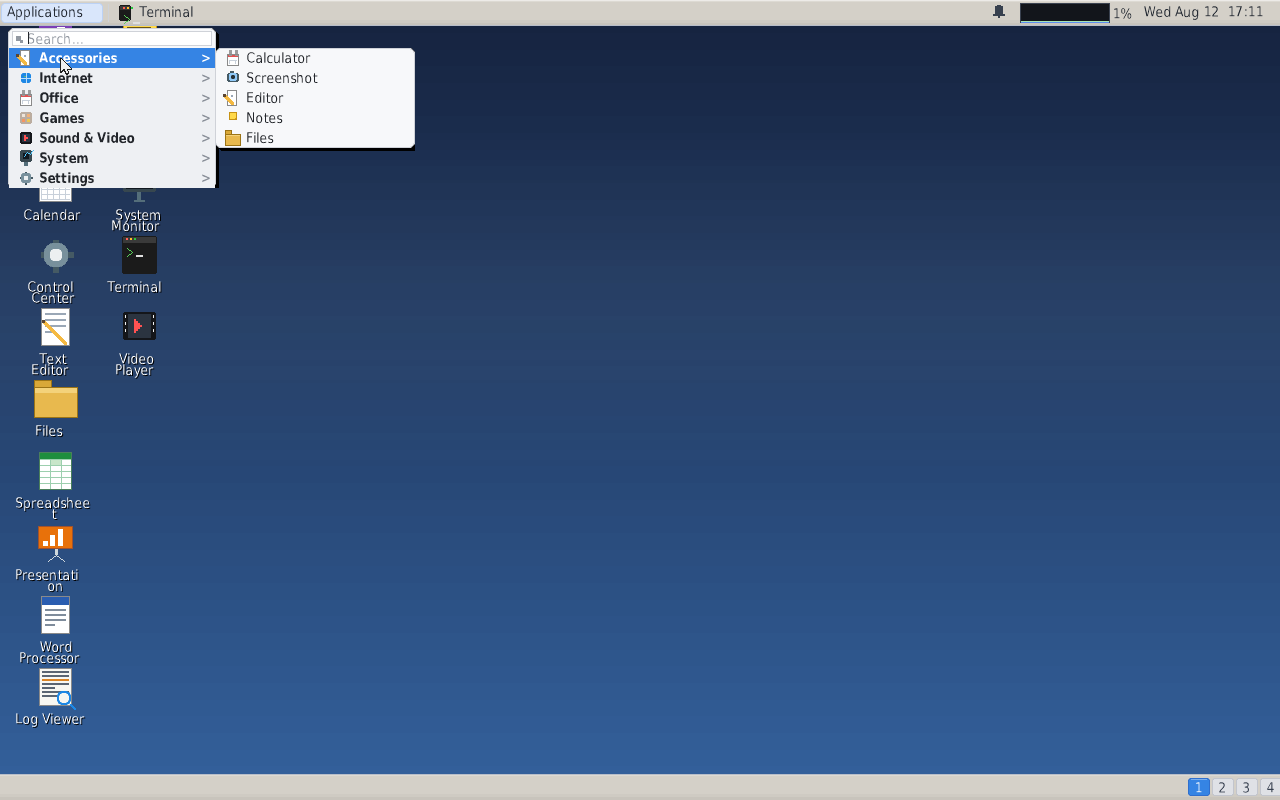
The Hamnix Linux desktop with the Applications menu open and the Accessories submenu flying out
The desktop and the Applications menu — search box, categories, fly-out submenus. Every entry listed here names a program that is on the machine; until 1.0.20, nine of eleven did not.
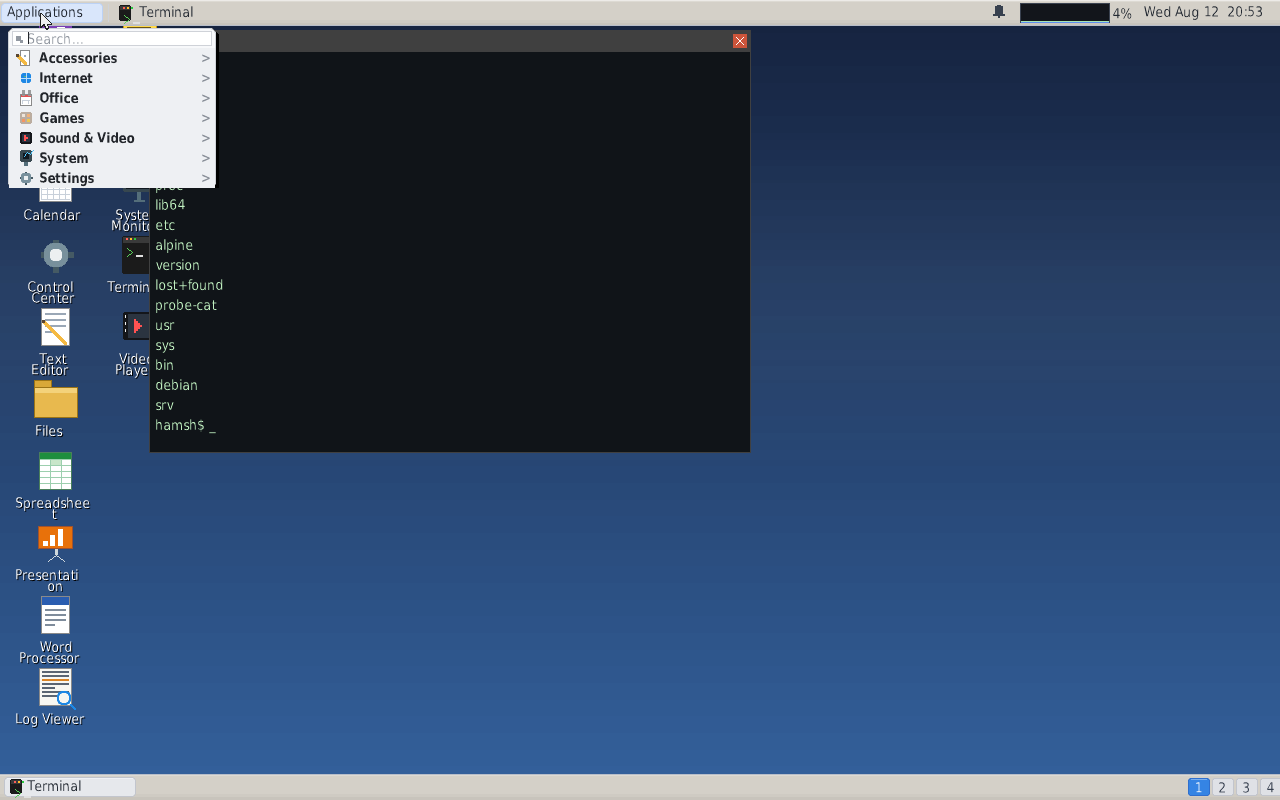
Hamnix Linux running on an installed UEFI and ext4 disk, with a terminal listing the root directory
An installed machine — booted from a real ESP onto a real ext4 root, with hamsh listing that root. debian and alpine in the listing are the two namespaces, mounted by volume label.
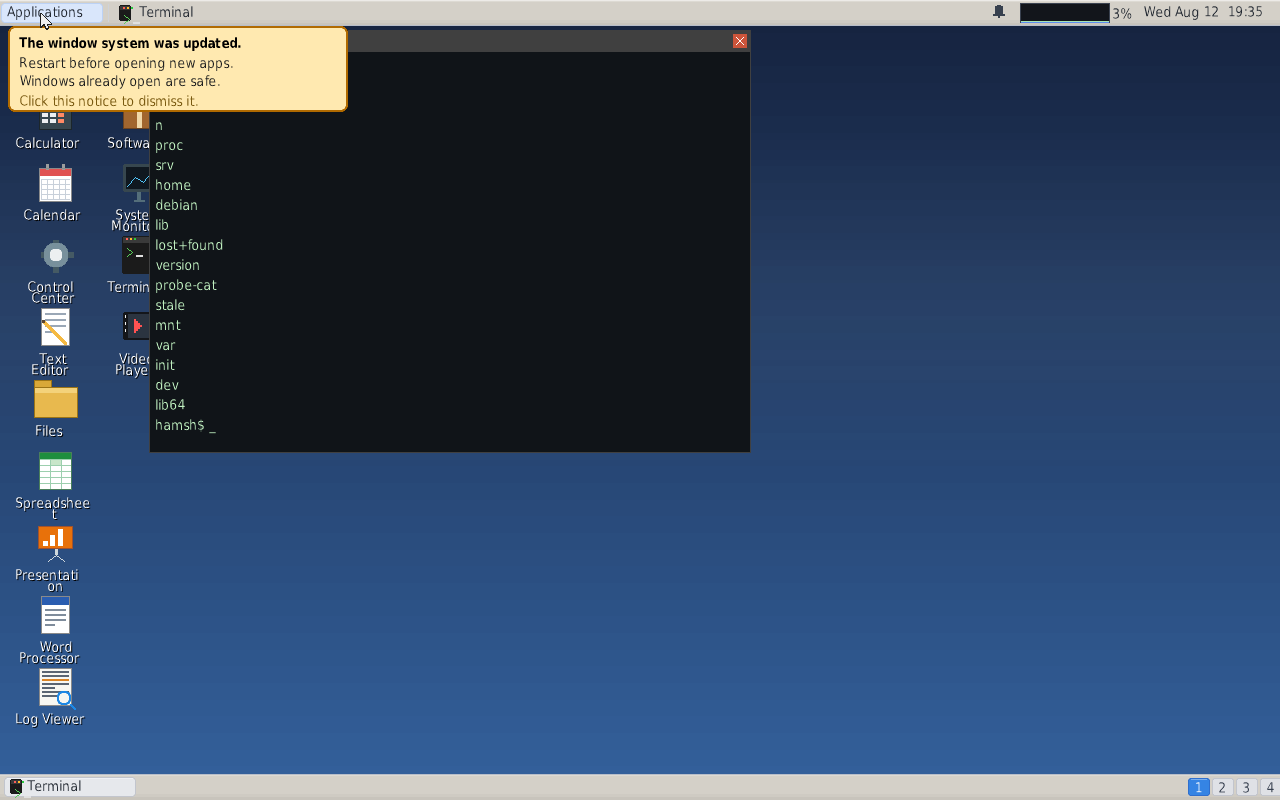
An amber notice under the panel reading: The window system was updated. Restart before opening new apps.
What an update looks like when it needs a restart — the desktop survives the window-system upgrade whole, and says so rather than letting the next click appear to do nothing. Captured on an installed UEFI + ext4 disk.
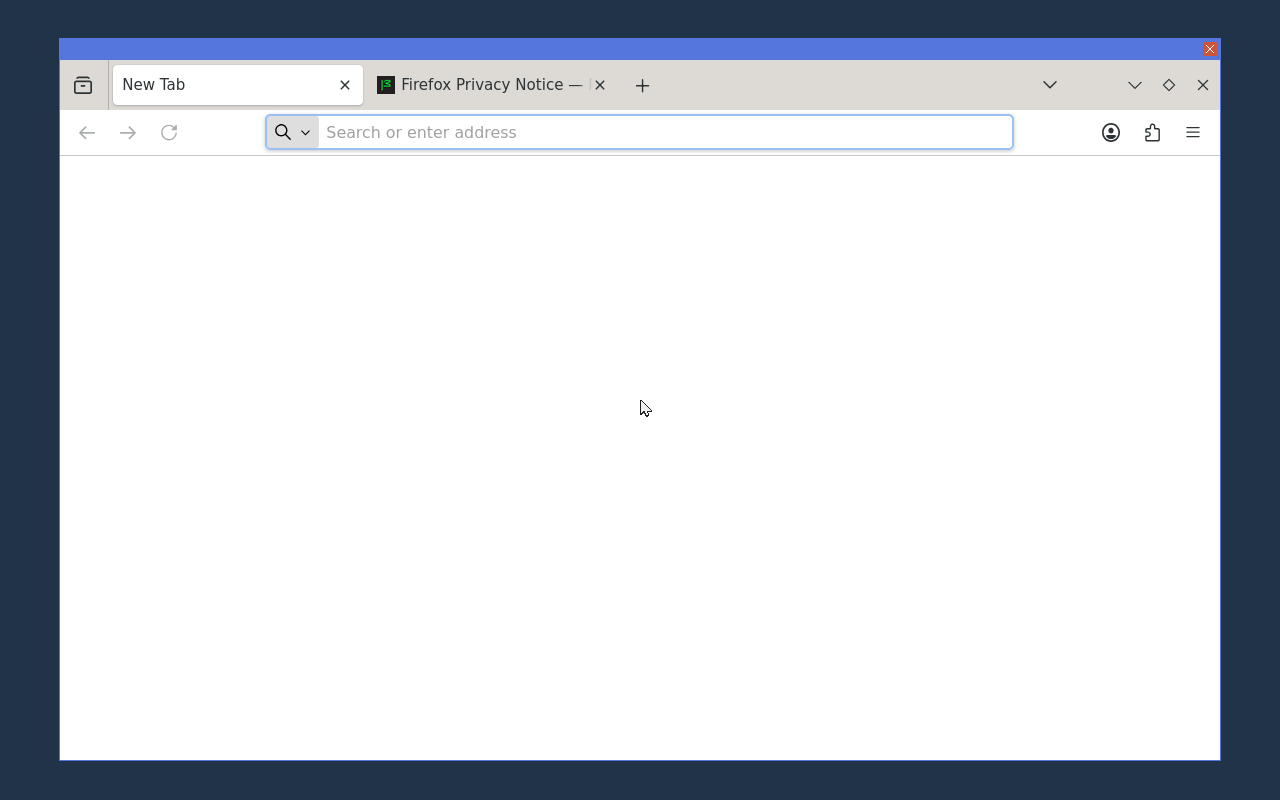
Firefox running in a Hamnix window with its full chrome, tab strip and address bar
Firefox — running as a native Wayland client against the Adder compositor's Wayland server, in a Hamnix window with a close button on it. This capture is a new tab; it is not evidence about how any particular site renders.
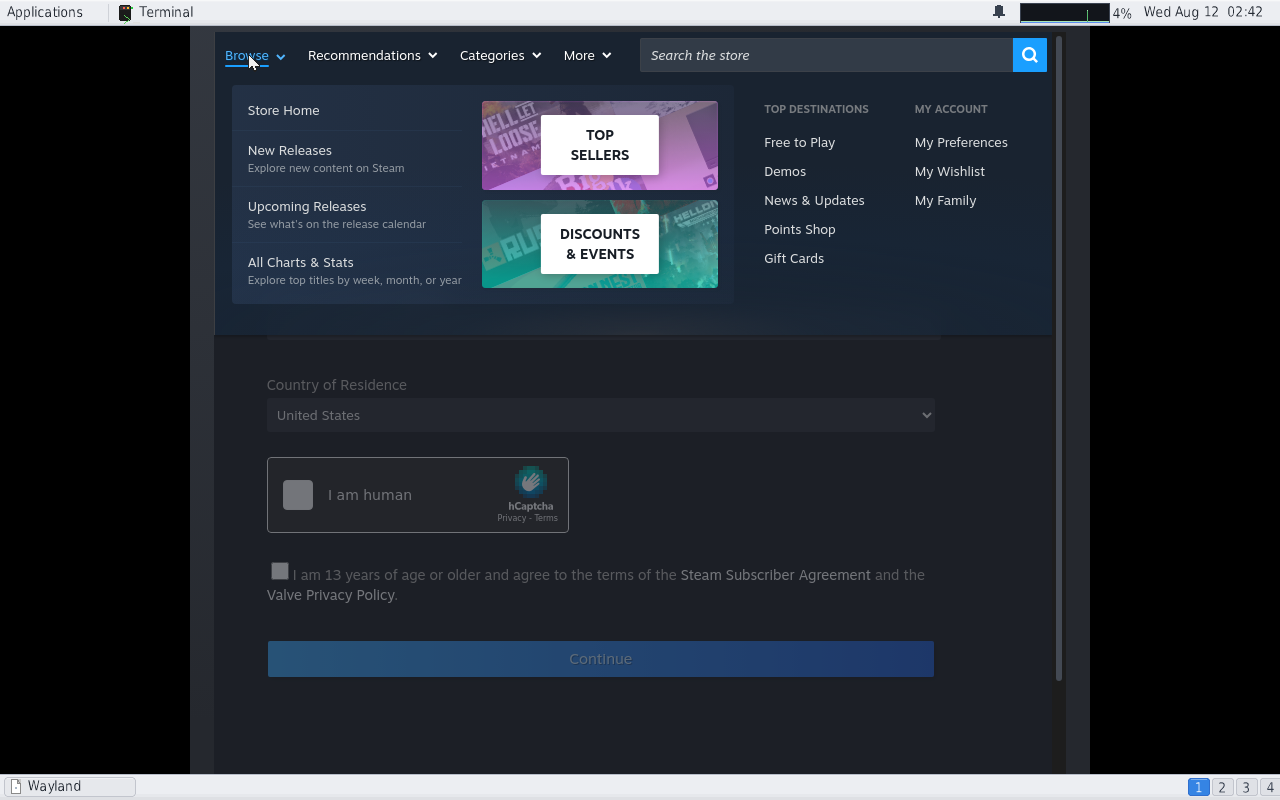
The Steam client showing its store Browse menu with cover artwork, inside a Hamnix window
Steam, through the X bridge — the store front page, its Browse menu with live CDN artwork, scrolling and search. No account was used, so the library, downloads and launching a game are unmeasured and are not claimed.
One thing these pictures do not show you. The CPU meter in the panel of the harness captures reads the machine that ran the capture, not the guest in the picture. Ignore that number here; the guest's own cost is measured separately, below.

Two numbers about the desktop

Both are the result of finding something that was wrong, and both are stated with the conditions they were measured under. Neither is a comparison against anything else — no other desktop was measured on a comparable stimulus, and where a comparison was attempted it turned out not to be constructible, so these numbers stand alone on purpose.

WhatThen → nowConditions
Input reaching the screen ~10 ms → ~0.3 ms The compositor woke on a fixed timer regardless of what you did; it now wakes because you did something. Three before/after pairs run back to back on one host: median 8.9 ms before, 0.33–1.07 ms after. Idle cost did not regress — parks per second are equal on both sides. Shipped in 1.0.22.
Dragging a window ~36% → ~4% of a core The compositor was doing work nobody could see, and waking for applications while it already owed a frame. Measured on a real display in one session with one binary, with the probe proven against a known 50% load in the same run. Treat this as a floor, not a promise: the test window draws less than a real one, so a desktop with real content in it will cost somewhat more at both ends. Shipped in 1.0.22.
File manager, sitting open 102.7% → 7.2% of a core It was polling for keystrokes that were never coming instead of waiting for them, which froze the whole desktop. Shipped in 1.0.20.
An idle desktop being idle 23 programs → 0.0 s Twenty-three programs each burned a whole core simply by being open, and every gate on the tree passed while they did it — only a measurement of time could see it. All 50 painting clients now measure 0.0 s of CPU across a 15-second run, pixel-identical before and after. Shipped in 1.0.12.
These are measurements, not benchmarks. Each was taken on one machine under a stated load, and the two marked shipped in 1.0.22 were taken on the code that is now on the channel, not on a branch that had not reached anybody yet. This site tries hard to keep those two things from quietly becoming the same sentence.

Where it honestly stands

A virtual machine, and hybrid development on a host, are the primary paths right now. Native installation onto real hardware is in progress. Everything below says which it is.

AreaStateDetail
Boot (UEFI, virtual machine)works Linux kernel → the Adder PID 1 → namespace via bindhamsh → the rc scripts → a desktop. This is the tested path.
Installed disk (UEFI + ext4)works UEFI → a unified kernel image on an ESP → PID 1 → the real ext4 root. Files written on one boot are there on the next. Measured in a virtual machine.
Real hardwareuntested Not tried, and therefore not claimed. No physical machine has been booted and reported here. VM and hybrid development are primary at the moment.
Native installin progress Being built. When a physical machine has booted this and been measured, it will say so here and not before.
Updating itselfworks hpm pulls the whole distribution from 255.one/linux/ over TLS with Ed25519-signed indexes, and can replace /bin/hamsh while it is PID 1. Proven from an old install to a newer build with no re-imaging.
Desktopworks Compositor, panel, taskbar, workspaces, categorised menu with search and favourites, file manager, terminal, text editor, system monitor. 25 applications in seven categories.
Kernel modulesworks modprobe resolves a name to a module and loads its dependencies in order, out of a real modules.dep. 32 PASS / 0 FAIL, and 12 of 19 with the change reverted.
Networkingworks TCP, UDP, ICMP, TLS and DHCP over the /net file tree, with announce/accept across process boundaries.
Audioworks intel-hda through /dev/audio. Proven by FFT on a WAV captured out of the VM: the tones come back at the frequencies and durations that went in.
Debian & Alpine namespacesworks Both in one boot, from the console and as an unprivileged desktop user, with a negative control proving each is invisible inside the other.
X programspartial Firefox runs as a native Wayland client; X11 clients run through Xwayland. A rootless bridge makes each X window a window of this desktop — it is built and measured but is not the default arm, and the first connection is still intermittent.
Steampartial Its store front page renders, scrolls and searches, driven with real pointer and keyboard events. No account was used, so the library, downloads and launching a game are unmeasured and not claimed.
Our own web enginepartial hambrowse renders pages. The fix that made a window larger than 512×512 draw at all shipped in 1.0.22.
Wi-Fiuntested No wireless hardware has been exercised. The kernel is stock, so its drivers are present; that is not the same as having tried one.
GPU accelerationno Software rasteriser throughout. The scanout path ships inert and is not enabled by default.
Do not put this on a machine you care about. It writes real partitions and real filesystems, and no physical machine has been tested. A virtual machine is the right place to run it. If you do try hardware, a report either way — booting or not — is the single most useful thing anyone could send.

Running it

There is no release image yet. You build the tree and boot it under QEMU; the host needs Python, clang, QEMU and OVMF.

# the compiler is a submodule, so clone recursively
git clone --recurse-submodules https://github.com/HamnixOS/hamnix-linux
cd hamnix-linux

# stage the root and pack the initramfs
bash scripts/hamlinux_image.sh

# boot it with a display, and you get the desktop
bash scripts/hamlinux_vm.sh gpu

Once it is up, the machine talks to this site. hpm verifies the channel index's Ed25519 signature before it believes a single package.

# on a running Hamnix Linux system
hpm refresh https://255.one/
hpm install hamnix-base
hpm update

Source & contact

Repositories

HamnixOS/hamnix-linux — this distribution.
HamnixOS/Hamnixthe native OS, sharing the userland.
HamnixOS/packages — this site and the package channels.

What changed, and why

The changelog names what changed for someone using the machine, and lists work that was measured and deliberately not done, because a number that says "don't" is a result too.

Reports welcome

Boot logs from physical machines — especially ones that fail — are the most useful thing right now, and so are pages that render badly. Open an issue.